What Is a Click-to-Chat Button (All-in-One Chat Button)
Summary: A Click-to-Chat button, also known as an All-in-One Chat Button, lets visitors contact your business through their favorite messaging apps—WhatsApp, Messenger, Telegram, Instagram, and more—using one floating button on your website. Oscar Chat’s version combines all channels, automation, and lead tracking in a single tool designed to boost engagement and conversions.
Introduction: Meet the Click-to-Chat Button
Today’s customers want instant answers on their preferred messaging apps—not email forms or waiting queues. The Click-to-Chat button bridges that gap by making communication effortless. With a single tap, visitors can open WhatsApp, Messenger, Instagram, Telegram, or any other channel you connect.
Oscar Chat takes it even further. Its All-in-One Chat Button integrates multiple messaging apps, AI automation, and lead tracking into one sleek, customizable widget. Instead of managing separate chat icons or plugins, you provide a seamless, unified experience.
What Is a Click-to-Chat Button?
A Click-to-Chat button is a small interactive widget that appears on your website—usually in the bottom corner—and allows visitors to instantly start a conversation with your business on their preferred platform.
Click: The visitor selects their preferred channel.
To-Chat: The system opens that app with a pre-filled message or a chatbot conversation.
Instant connection: No forms, no delays—just direct messaging.
Oscar Chat’s version adds automation and analytics to this process, turning each click into a trackable, conversion-ready lead.
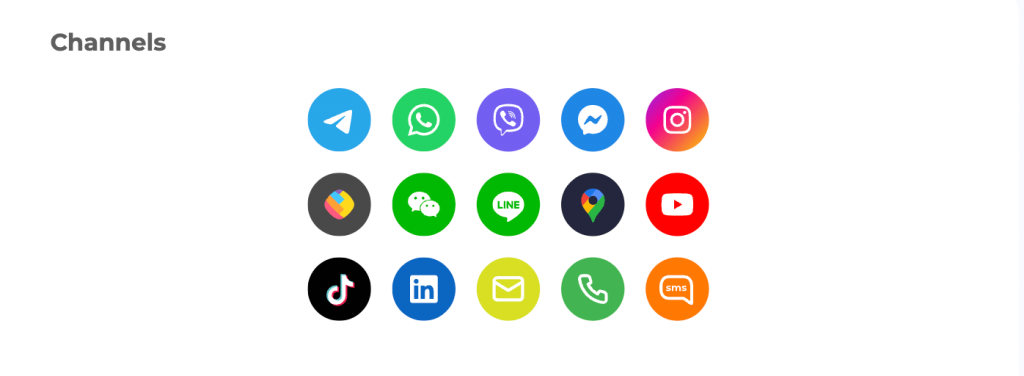
Supported Channels in Oscar Chat’s All-in-One Button
With Oscar Chat, your button can include over a dozen communication channels—all accessible in one place.
💬 WhatsApp – The most used chat app globally.
📩 Facebook Messenger – Connects directly with your Facebook Page audience.
📱 Instagram Direct – Perfect for social commerce and DM inquiries.
✈️ Telegram – Secure and fast messaging for tech-savvy audiences.
📞 Phone and SMS – Let users call or text with one tap.
💼 LinkedIn – For B2B lead generation and professional outreach.
📧 Email – Direct messaging for detailed inquiries.
🌍 Google Maps – One-tap directions for location-based businesses.
🎥 YouTube, TikTok – Drive engagement to your video content.
Instead of cluttering your footer with multiple links, the Oscar Chat widget unifies everything in a single, elegant floating button—like the one in the screenshot above.
Key Benefits of the All-in-One Click-to-Chat Button
1. Higher Conversion Rates
Every extra step between interest and contact lowers your conversion rate. With Oscar Chat, visitors can contact you instantly on their favorite app, increasing leads by up to 40%.
2. Improved Response Times
Instant chat means faster answers. The AI assistant can reply immediately when your team is offline, so no lead is ever lost.
3. Better User Experience
Instead of forcing users into one channel, Oscar Chat gives them freedom. Whether they prefer WhatsApp, Messenger, or Telegram, it feels personal and natural.
4. Unified Management
All messages, across all channels, are managed from one dashboard. No more switching tabs or losing context between conversations.
5. Powerful Analytics
See which channels convert best, what times users engage most, and which campaigns drive chat traffic. Optimize your marketing with real data, not guesses.
Oscar Chat’s AI assistant turns your chat button from a passive link into an active lead generator. It can:
Greet visitors automatically.
Answer frequent questions instantly.
Capture names, emails, or phone numbers.
Route inquiries to the right department or platform.
Integrate with forms and popups for deeper lead collection.
Every interaction becomes an opportunity for conversion—even when your team is offline.
Full Customization: Match Your Brand Style
Oscar Chat’s widget is designed to blend perfectly with your website look. You can customize:
🖌️ Button color, position, and shape.
📲 Channel order and icons (choose from 15+ apps).
💬 Greeting messages and popup prompts.
⏱️ Appearance timing (on scroll, delay, or exit intent).
🌐 Language and regional targeting.
The result: a user-friendly experience that feels like a natural extension of your brand, not a plugin.
How the Chat Button Improves Marketing ROI
Every click gives you insight. Oscar Chat tracks where visitors come from, which campaign triggered the chat, and what channel they use most. Combine that with UTM tracking, and you can measure exactly which ad generated a conversation or sale.
Create a workspace and select “All-in-One Widget.”
Add your channels: choose WhatsApp, Messenger, Telegram, etc.
Customize: adjust colors, text, and triggers.
Copy the code snippet and paste it into your site’s header or Google Tag Manager.
That’s it. Your multi-channel chat button will appear instantly across your pages, ready to engage every visitor.
Start Converting Visitors Today
The All-in-One Click-to-Chat Button by Oscar Chat turns your website into a conversation hub. Whether it’s WhatsApp, Messenger, or Instagram DM, you’ll always be one tap away from your customers.
Start for free—it takes just a few minutes to install and can immediately increase engagement and leads on your site.
FAQ: Click-to-Chat Button by Oscar Chat
What is a Click-to-Chat button?
It’s a floating button on your website that lets visitors start chatting instantly with your business via WhatsApp, Messenger, Telegram, or other messaging apps.
What makes Oscar Chat’s button different?
Unlike basic plugins, Oscar Chat’s All-in-One Button supports 15+ channels, includes AI automation, analytics, and full customization—all in one code snippet.
Do I need coding skills to install it?
No. Oscar Chat is fully no-code. Simply copy the provided script into your website and it’s live in seconds.
Can I customize the button’s look?
Yes. You can change the color, position, icons, animation, and message text to match your brand style.
Which messaging apps can I connect?
WhatsApp, Messenger, Telegram, Instagram, Viber, LinkedIn, Email, SMS, and more. You can enable as many as you want.
Does it support multiple team members?
Yes. The Oscar Chat workspace allows up to 5 users on the Basic Plan, and more on higher tiers.
Can I track performance and conversions?
Yes. Analytics show which channels drive the most clicks, messages, and leads—so you can improve ROI with real data.
Is the chat widget mobile-friendly?
Absolutely. It’s fully responsive and optimized for mobile users, where over 70% of chats happen.
How many widgets can I run at once?
Up to 3 All-in-One widgets are included in the Basic Plan, with unlimited monthly visits.
How do I get started?
Visit oscarchat.ai, create your free workspace, choose channels, and publish your All-in-One Chat Button in minutes.