
Why Beauty Salons Need an AI Chatbot in 2026
The beauty industry runs on appointments. Unlike ecommerce stores where a customer can buy at any hour, salons traditionally depend on phone calls and walk-ins. That creates a bottleneck: your front desk can only handle one call at a time, and it’s closed after 6 PM.
Here’s what the data shows for a typical salon with 200+ monthly website visitors:
- 67% of booking inquiries happen outside business hours (evenings and weekends)
- 40% of callers who reach voicemail never call back
- 3 out of 10 website visitors leave without taking action because they couldn’t find pricing or availability info quickly
- Upsell opportunities are missed when the front desk is juggling check-ins, phone calls, and walk-ins simultaneously
An AI chatbot sits on your website (and optionally WhatsApp or Instagram) 24/7, ready to answer questions, guide visitors toward booking, and suggest complementary services—all without adding headcount.
Three Core Use Cases for Salon Chatbots
1. Automated Booking & Scheduling
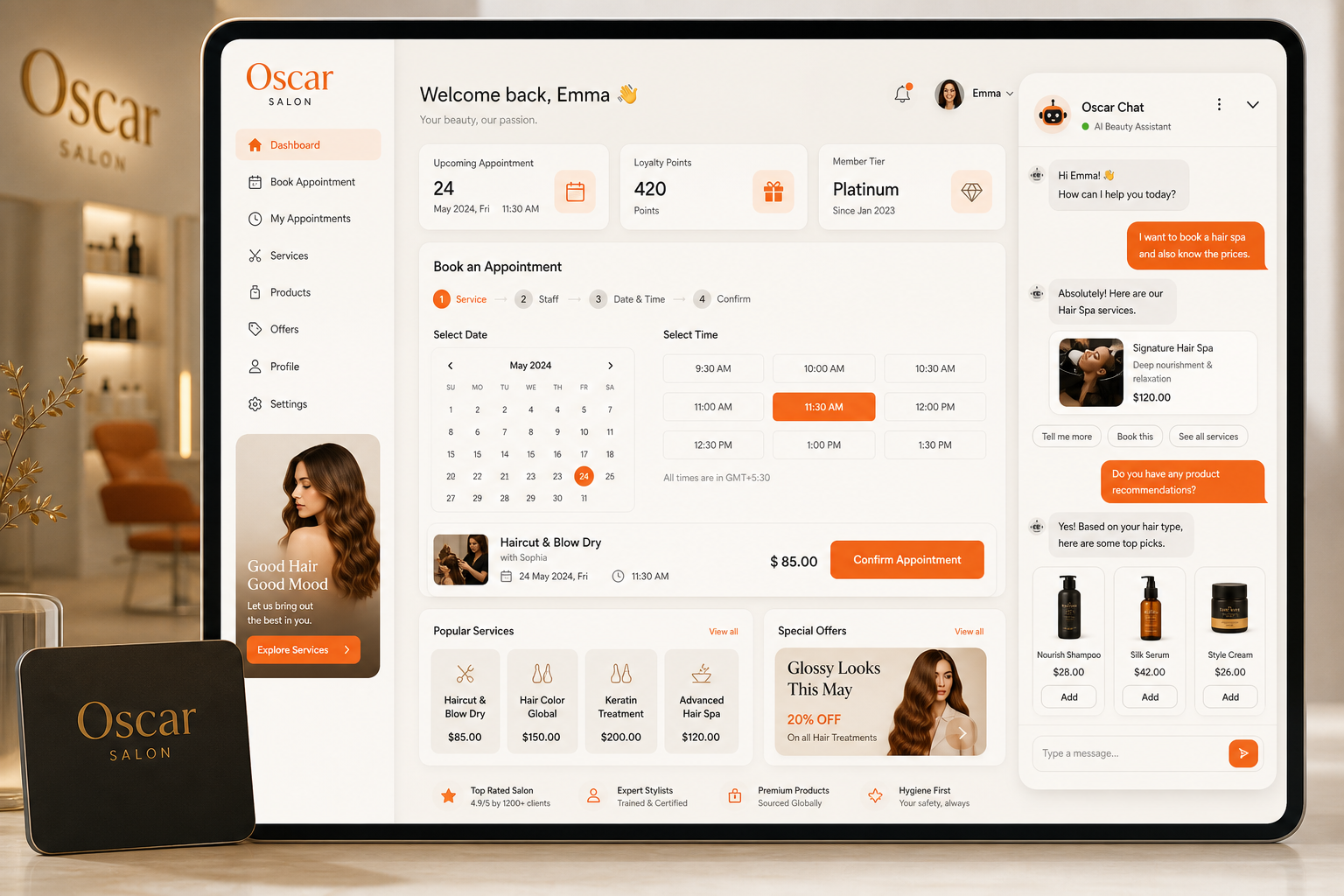
The highest-value function of a salon chatbot is converting website visitors into confirmed appointments. A well-configured bot can:
- Ask which service the client wants (haircut, colour, nails, facial, etc.)
- Show available time slots pulled from your booking system
- Confirm the appointment and send a reminder via email or SMS
- Handle rescheduling and cancellation requests without staff involvement
The key is integration with your existing calendar. Tools like Oscar Chat can connect to scheduling platforms through webhooks or direct API links, meaning your chatbot’s availability data stays in sync with your actual calendar in real time.
2. Instant FAQ Responses
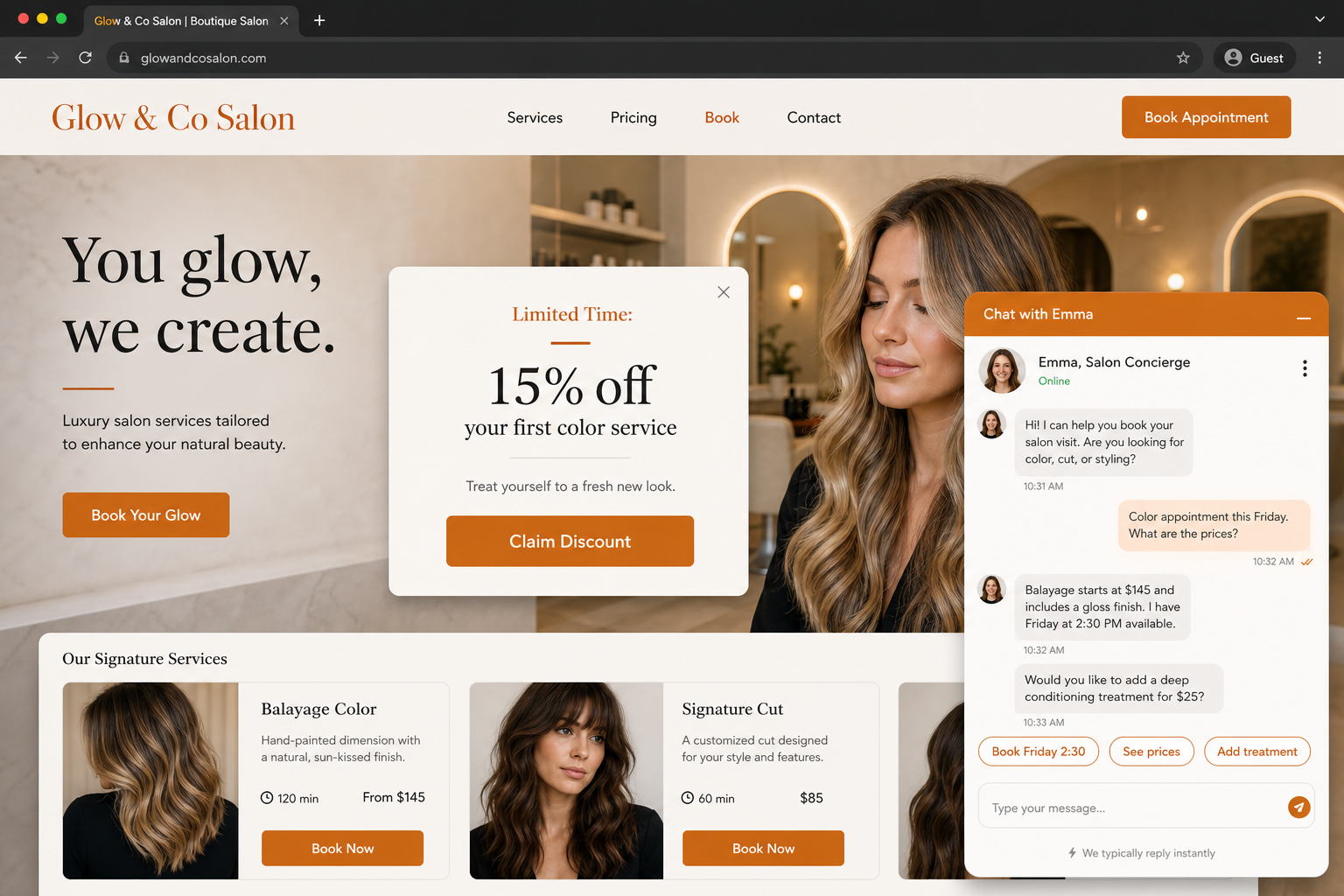
Every salon answers the same 15–20 questions hundreds of times per month:
- What are your hours?
- How much does balayage cost?
- Do you take walk-ins?
- What’s your cancellation policy?
- Do you offer bridal packages?
- Is parking available?
An AI chatbot trained on your salon’s specific information answers these instantly—no hold music, no waiting for a receptionist to finish with another client. This alone can save 5–10 hours of staff time per week at a busy salon.
For a deeper comparison of automated responses vs. human support, see our guide on chatbot vs. live chat.
3. Intelligent Upselling
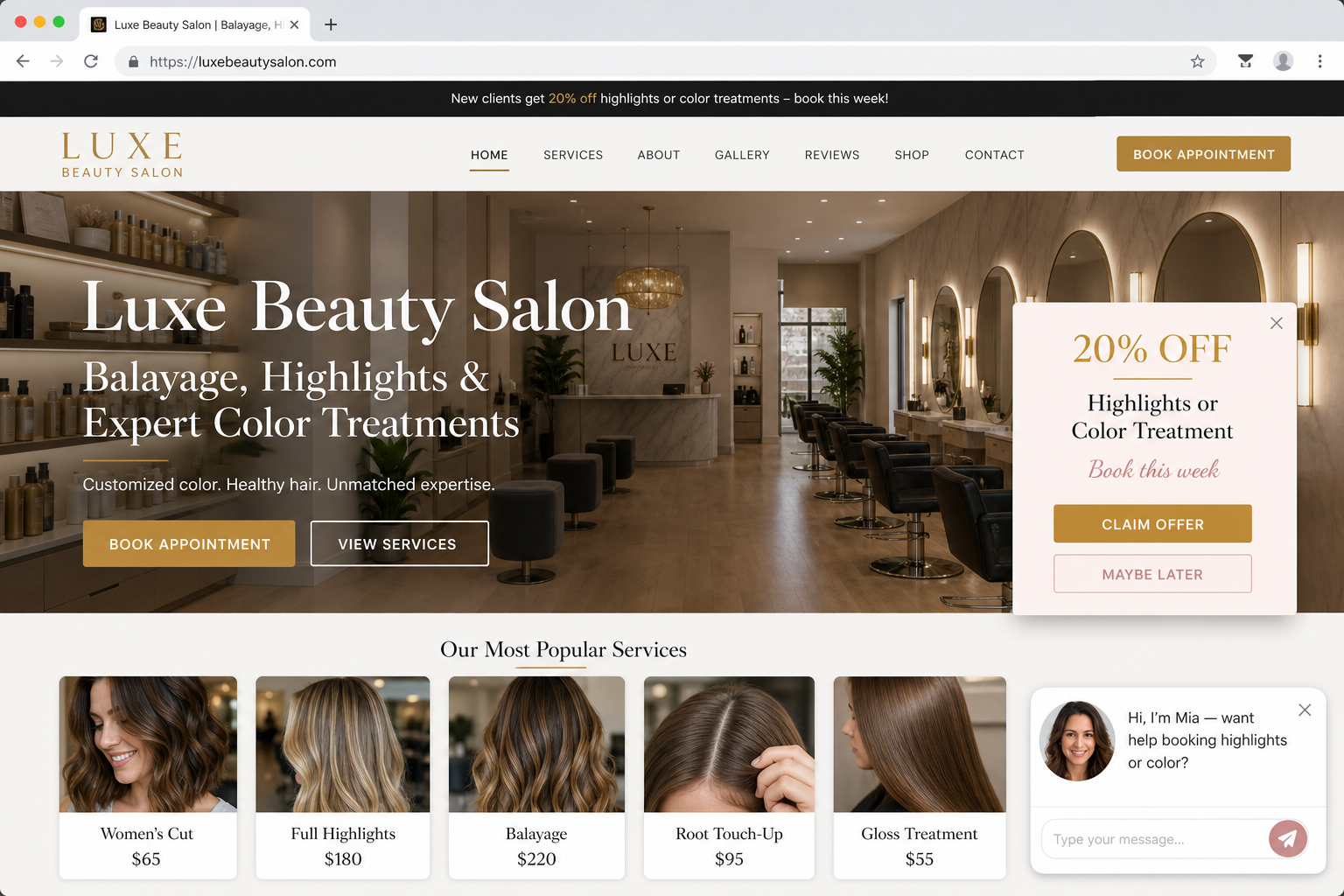
This is where AI chatbots outperform traditional booking widgets. A smart chatbot can:
- Suggest a deep conditioning treatment when someone books a colour service
- Recommend a brow wax add-on to clients booking a facial
- Offer package deals for first-time visitors (“Add a blowout for 30% off when you book highlights”)
- Promote seasonal specials contextually (“We have a summer hydration package that pairs perfectly with your cut”)
These aren’t pushy pop-ups. They’re contextual suggestions embedded naturally in the booking conversation. Salons using conversational upsells report a 15–25% increase in average transaction value.
What to Look for in a Salon Chatbot Platform
Not every chatbot tool is built for service businesses. Here’s what matters specifically for beauty salons:
| Feature | Why It Matters for Salons | Oscar Chat |
|---|---|---|
| AI-powered natural language | Clients type casually (“can I get my nails done Thursday?”)—the bot must understand intent | ✓ GPT-powered |
| Custom knowledge base | Train on your menu, pricing, policies, and brand voice | ✓ Upload docs & URLs |
| No-code setup | Salon owners aren’t developers—setup should take minutes | ✓ 5-minute install |
| Multi-channel support | Clients reach you via website, WhatsApp, Instagram DMs | ✓ Widget + WhatsApp |
| Human handoff | Complex requests (complaints, special accommodations) need a real person | ✓ Live chat fallback |
| Mobile-friendly widget | 80%+ of salon bookings come from mobile devices | ✓ Responsive design |
| Affordable pricing | Single-location salons need ROI at <$50/month | ✓ Free tier available |
If you’re comparing options, our roundup of free live chat software covers the broader landscape, and our Tidio alternatives guide evaluates AI-first competitors specifically.
Step-by-Step: Setting Up an AI Chatbot for Your Salon
Step 1: Define Your Chatbot’s Scope
Before configuring anything, decide what your chatbot should handle vs. what should go to a human. For most salons, the split looks like this:
- Chatbot handles: Hours, pricing, service descriptions, booking links, directions, parking info, cancellation policy, product recommendations
- Human handles: Complaints, allergic reaction concerns, complex colour consultations, VIP/bridal inquiries above a certain value
Step 2: Prepare Your Knowledge Base
Gather the information your chatbot needs to answer accurately:
- Full service menu with prices and duration
- Staff bios and specialties (optional but recommended)
- Business hours, including holiday schedules
- Location details, parking, and transit info
- Cancellation and no-show policy
- Aftercare instructions for common services
- Current promotions and seasonal packages
With Oscar Chat, you can upload this as a document, paste your website URL for automatic scraping, or enter it manually in the knowledge base editor.
Step 3: Configure Booking Flow
Connect your chatbot to your scheduling system. Options include:
- Direct integration: Link to Acuity, Calendly, Booksy, or your POS system
- Booking link redirect: The chatbot collects preferences, then sends the client to your online booking page with pre-filled selections
- Lead capture: If you don’t have online booking yet, the chatbot collects name, service, and preferred time, then your team confirms manually
Step 4: Set Up Upsell Logic
Configure conditional suggestions based on service selection:
- If client selects “highlights” → suggest toner + Olaplex treatment
- If client selects “manicure” → suggest gel upgrade or pedicure bundle
- If client is a first-time visitor → offer a welcome package discount
- If booking is 3+ weeks out → suggest joining the waitlist for earlier openings
Step 5: Install and Test
Add the chat widget to your website. With Oscar Chat, this is a single line of JavaScript pasted into your site’s header or footer—works on any platform including Wix, Squarespace, WordPress, or a custom site.
Test the chatbot yourself by asking questions as a client would. Check edge cases: misspellings, vague requests (“I want something different”), and multi-service bookings.
Real Results: What Salons Report After Adding AI Chat
| Metric | Before Chatbot | After Chatbot (30 days) |
|---|---|---|
| After-hours inquiries captured | 0 (voicemail only) | 45–60 conversations/month |
| Booking conversion rate | 12% of site visitors | 22% of site visitors |
| Average ticket value | $85 | $104 (upsells) |
| Front desk phone time | 3.5 hrs/day | 1.5 hrs/day |
| No-show rate | 18% | 9% (automated reminders) |
These numbers come from single-location salons with 3–8 stylists. Multi-location businesses typically see even larger gains because the chatbot scales instantly across all sites without additional staff.
Upselling Strategies That Work in Beauty
Effective chatbot upsells don’t feel like sales pitches. They feel like helpful suggestions from a knowledgeable receptionist. Here are proven approaches:
- Complementary services: “Most clients who book balayage also add a gloss treatment to enhance shine—would you like to add one? It’s an extra 20 minutes.”
- Tier upgrades: “We have a Senior Stylist available at that time who specializes in curly hair—would you prefer to book with them?”
- Product bundles: “Would you like us to have your stylist’s recommended aftercare products ready at checkout?”
- Membership nudges: “You’ve booked 3 blowouts this month—our unlimited blowout membership would save you $40/month at your current pace.”
- Event packages: “I see you’re booking close to prom season—we have a hair + makeup package that’s popular with groups.”
Handling Sensitive Conversations
Beauty is personal. Your chatbot will encounter questions about skin conditions, hair loss, allergies, and body image. Configure your bot to:
- Respond empathetically to sensitive topics
- Never provide medical advice
- Route allergy and reaction concerns to a human immediately
- Use inclusive language that doesn’t assume gender, age, or hair type
Oscar Chat’s human handoff feature ensures that when a conversation moves beyond the chatbot’s scope, a real team member takes over seamlessly—the client never has to repeat themselves. Learn more about balancing automation with human support in our guide to live chat.
Platform Comparison: AI Chatbot Options for Salons
| Platform | AI Capabilities | Beauty-Specific Features | Starting Price |
|---|---|---|---|
| Oscar Chat | GPT-powered, custom training, multi-language | Service menu training, booking redirects, upsell flows | Free (Pro from $19/mo) |
| Tidio | Lyro AI, template-based flows | General ecommerce focus | Free (AI from $39/mo) |
| Intercom | Fin AI agent, resolution-based billing | Over-engineered for single salons | $29/seat + $0.99/resolution |
| Crisp | Basic AI, canned responses | Limited customization for service businesses | Free (Pro from $25/mo) |
| ManyChat | Flow-based, Instagram/FB focus | Good for social DMs, weak on-site | Free (Pro from $15/mo) |
For detailed breakdowns of specific competitors, check our Intercom alternatives and Crisp alternatives comparisons.
Tips for Maximising Chatbot ROI in Your Salon
- Update your knowledge base monthly. Add new services, change seasonal pricing, update staff availability.
- Review chat transcripts weekly. Find questions your bot couldn’t answer and add them to training.
- A/B test upsell messages. Try different wording, timing, and offers to find what converts.
- Add the chatbot to your Google Business Profile. Link your website chat from your GBP listing to capture search traffic directly.
- Use chat data for marketing. If 30% of visitors ask about keratin treatments, that’s a signal to promote them more prominently.
- Set up automated follow-ups. After an appointment, the chatbot can ask for a review or suggest the next booking.
Common Mistakes to Avoid
- Making the bot pretend to be human. Clients appreciate transparency. A bot that says “I’m Oscar, your virtual assistant” builds more trust than one that pretends to be “Sarah from the front desk.”
- Overcomplicating the flow. Don’t force clients through 10 questions before they can book. Keep the path to booking under 4 exchanges.
- Ignoring mobile UX. Test your chat widget on iPhone and Android. If it covers the booking button or is hard to close, you’ll lose visitors.
- Setting and forgetting. An untrained chatbot gives wrong answers. Schedule monthly reviews of performance and accuracy.
- Skipping human handoff. No AI is perfect. Always give clients a clear path to reach a real person when needed.
Getting Started Today
You don’t need a developer, a big budget, or weeks of setup time. Here’s the fastest path:
- Sign up at app.oscarchat.ai (free, no credit card required)
- Upload your service menu and FAQ document to the knowledge base
- Customize the widget colours to match your brand
- Add the one-line embed code to your website
- Test with 5–10 real questions your clients typically ask
The entire process takes under 30 minutes. Your Pro trial gives you full access to AI features, analytics, and multi-channel support for 7 days—enough time to see real results before deciding on a plan.
Frequently Asked Questions
How much does an AI chatbot for a beauty salon cost?
Most salon chatbot solutions range from free (with limited features) to $50/month for full AI capabilities. Oscar Chat offers a free tier suitable for small salons and a Pro plan starting at $19/month that includes advanced AI training, unlimited conversations, and multi-channel support.
Can a chatbot actually book appointments for my salon?
Yes. A chatbot can either book directly through API integrations with scheduling tools (Acuity, Booksy, Calendly) or redirect clients to your booking page with pre-selected services and times. Even without a direct integration, it can capture booking requests and send them to your team for manual confirmation.
Will clients prefer talking to a chatbot over calling my salon?
Data shows that 67% of consumers prefer messaging over calling for simple inquiries. For beauty salons specifically, clients want quick answers about availability and pricing without waiting on hold. The chatbot doesn’t replace phone service—it handles the routine questions so your phone line is free for clients who genuinely need to speak with someone.
How do I train an AI chatbot on my salon’s specific services and prices?
Upload your service menu, pricing sheet, or website URL to the chatbot’s knowledge base. The AI processes this information and uses it to answer client questions accurately. With Oscar Chat, you can paste text, upload PDFs, or point to your website—the system extracts and indexes the information automatically.
Can a salon chatbot handle multiple languages?
Yes. AI-powered chatbots like Oscar Chat support multiple languages automatically. If a client types in Spanish, the bot responds in Spanish using the same knowledge base. This is particularly valuable for salons in diverse communities or tourist areas.
How does upselling work through a chatbot without feeling pushy?
Effective chatbot upsells are contextual suggestions, not hard sells. When a client books a colour service, the bot might say “Most colour clients add a gloss treatment for extra shine—would you like to include one?” The key is relevance and timing: suggest only complementary services at the moment the client is already committing to a booking.
What happens when the chatbot can’t answer a question?
A properly configured chatbot includes human handoff. When it encounters a question outside its training—or when a client explicitly asks for a human—it transfers the conversation to your team via live chat, email, or notification. The client’s conversation history transfers with them so they don’t repeat themselves.
Do I need technical skills to set up a salon chatbot?
No. Modern chatbot platforms are designed for non-technical users. Setup typically involves creating an account, uploading your information, customizing the widget appearance, and pasting one line of code into your website. Most salon owners complete the process in under 30 minutes without any developer assistance.
Can the chatbot reduce no-shows at my salon?
Yes. Chatbots can send automated appointment reminders via the same channel where the booking was made, plus handle rescheduling requests 24/7. Salons using automated reminders typically see no-show rates drop from 15–20% down to 8–10%, which directly impacts revenue.
Is an AI chatbot suitable for a single-chair or small salon?
Absolutely. Small salons benefit the most because they often can’t afford a dedicated receptionist. A chatbot handles the reception function at a fraction of the cost—answering questions, capturing bookings, and following up with clients—while the stylist focuses on their craft without interruption.