
Here’s who it’s for, why it works, and how to do it in about ten minutes.
Who should train their chatbot by crawling their website
Website crawling isn’t for everyone — but if you recognize yourself below, it’s almost certainly the right move.
Online stores with real catalogs. If you sell on Shopify or WooCommerce and your catalog has dozens or hundreds of products, writing Q&As for each one is a non-starter. Your product pages already contain the descriptions, specs, sizes, and materials. Crawling turns every page into training data automatically.
Businesses whose website already answers customer questions. FAQs, help centers, shipping and return policies, pricing pages, booking instructions — if this content exists and is up to date, your chatbot can learn it in minutes instead of you retyping it into another system.
Teams that update content constantly. New products, seasonal collections, price changes, new policies. With crawling, you update your website once and re-crawl — the bot follows. No duplicate maintenance across two systems.
Businesses serving customers in several languages. A crawled knowledge base can power answers in 50+ languages from a single source. For clinics, hotels, and stores with international visitors, that removes an entire layer of translation work.
If your website is thin, outdated, or says very little — crawling alone won’t save you. But for most established businesses, the website is already the best training manual they have.
Why train your bot on your website at all
A chatbot is only as good as what it knows. When the knowledge comes straight from your website, three things happen:
Answers stay accurate. The bot quotes your actual policies, your actual prices, your actual product details — not a generic AI guess and not a stale spreadsheet someone filled in last year.
You stop doing double work. Your website is already the place you maintain. Training from it means one source of truth instead of two: no separate knowledge base to keep in sync.
The bot speaks in your voice. Product names, terminology, tone — it all comes from your own pages, so customers get answers that sound like your business, not like a robot reading Wikipedia.
How to train your chatbot by crawling: a step-by-step tutorial
The old workflow looked like this: export content, rewrite it as Q&A pairs, upload, test, fix, repeat. For a mid-size store, that was a two-to-four-week project before the bot answered its first real question.
The crawling workflow takes minutes. Here’s exactly how it works in Oscar Chat — and what’s important to get right at each step.
Before you start: what to check
Your website should be up to date. The bot learns what’s actually on your pages — outdated prices or old policies will be learned as-is. Give key pages (products, shipping, returns, contacts) a quick once-over first.
Know what crawling can’t see. It reads public pages only. Anything behind a login, plus knowledge that was never published (promotions, internal rules), needs to be added separately — we’ll cover the alternative ways in Step 4.
One URL is enough to begin. Start with your main domain. You can add or exclude specific pages later.
1Paste your website URL
In the Oscar Chat dashboard, open the “Create AI Chatbot” window, paste your website address into the Domain field, and click Train. That’s the entire setup — no exports, no formatting, no spreadsheets. You can also submit a sitemap instead of a plain domain if you want to control exactly which pages get crawled.
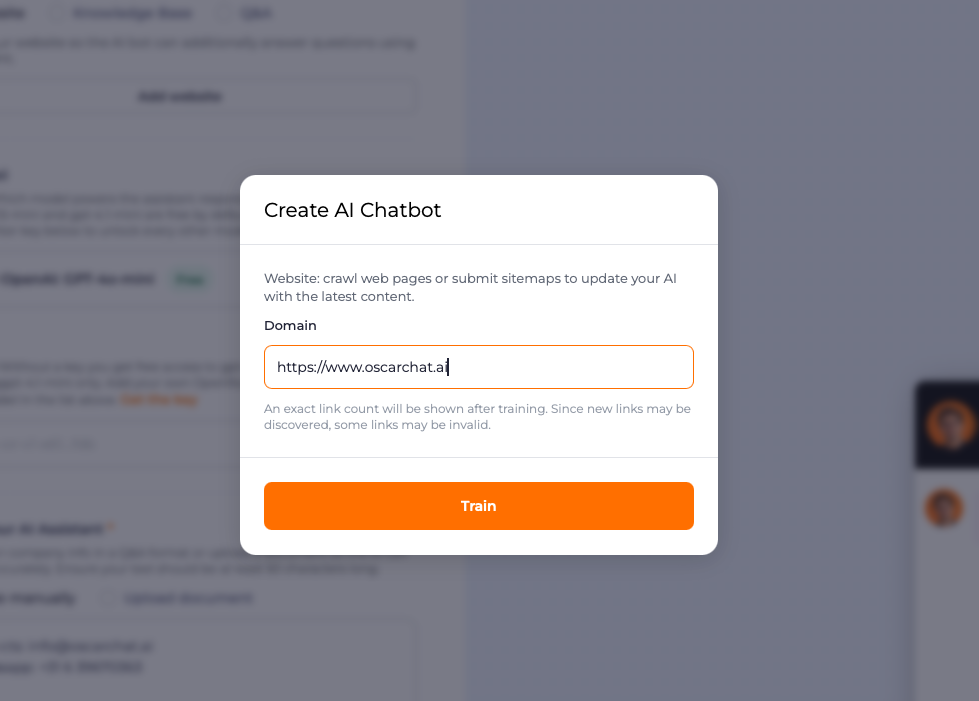
Important: use the canonical version of your domain (the one customers actually visit). If your store lives at `mystore.com`, don’t paste a staging or test subdomain.
2Run the crawl and review what was picked up
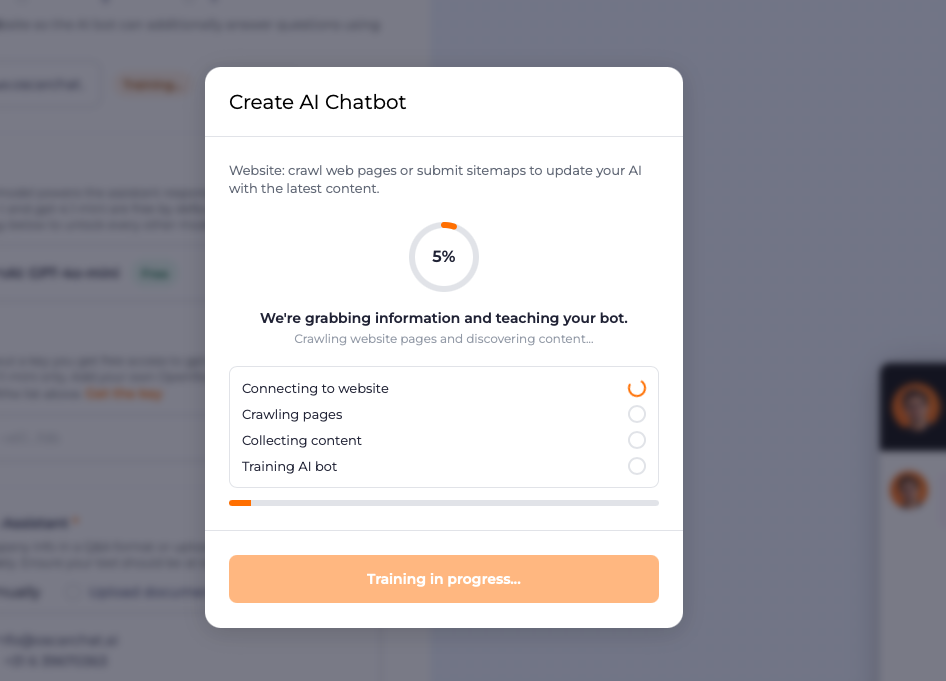
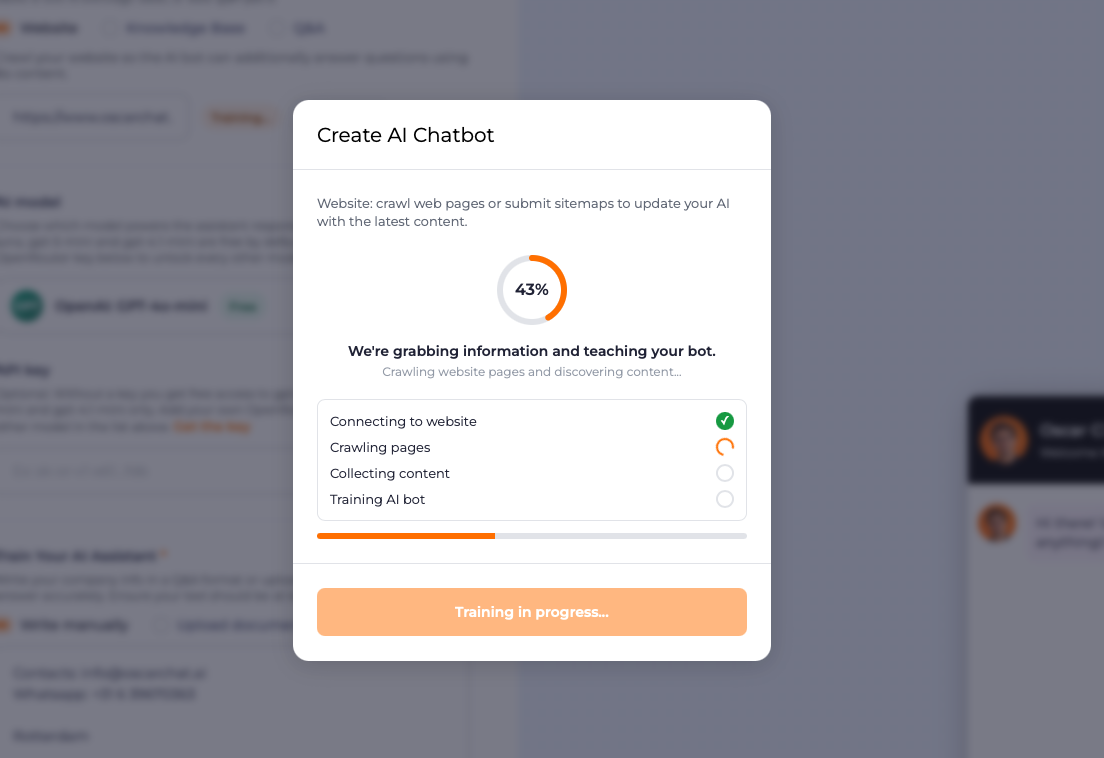
Click Train and Oscar Chat takes it from there: connecting to your website, crawling pages, collecting content, and training the bot — you watch the progress live. What took weeks of manual work now takes minutes.
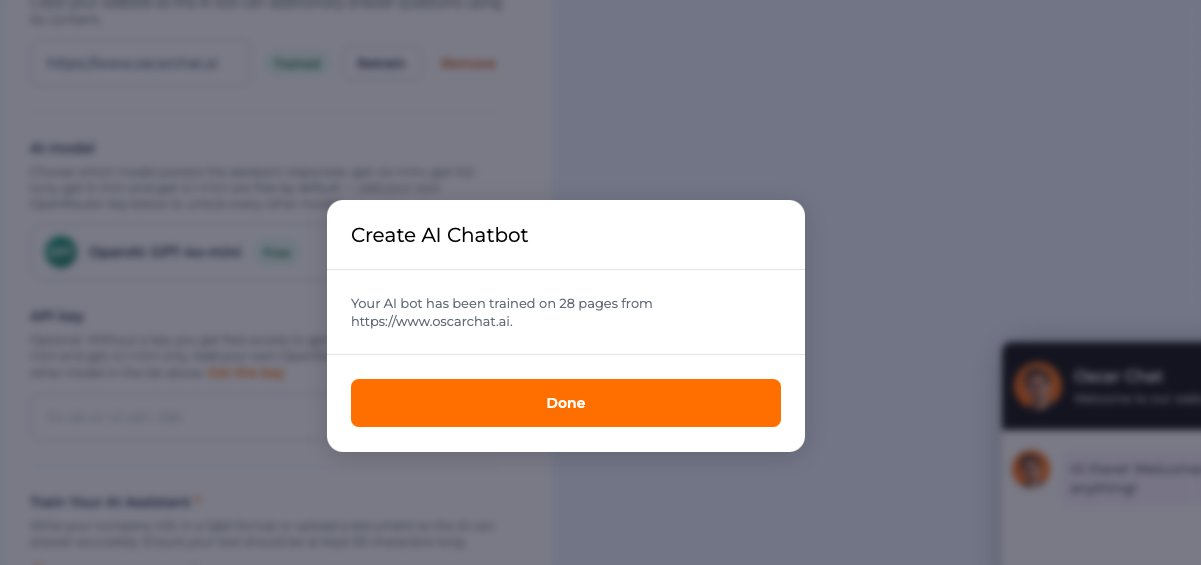
When it finishes, you’ll see exactly how many pages the bot learned from. Then review the captured pages. Two things to check:
- Are the key pages there? Products, shipping info, returns, pricing, contact details. If an important page is missing, add its URL directly.
- Is there junk to exclude? Thank-you pages, test pages, outdated campaign landing pages — exclude anything you don’t want the bot quoting.
3Test, then launch
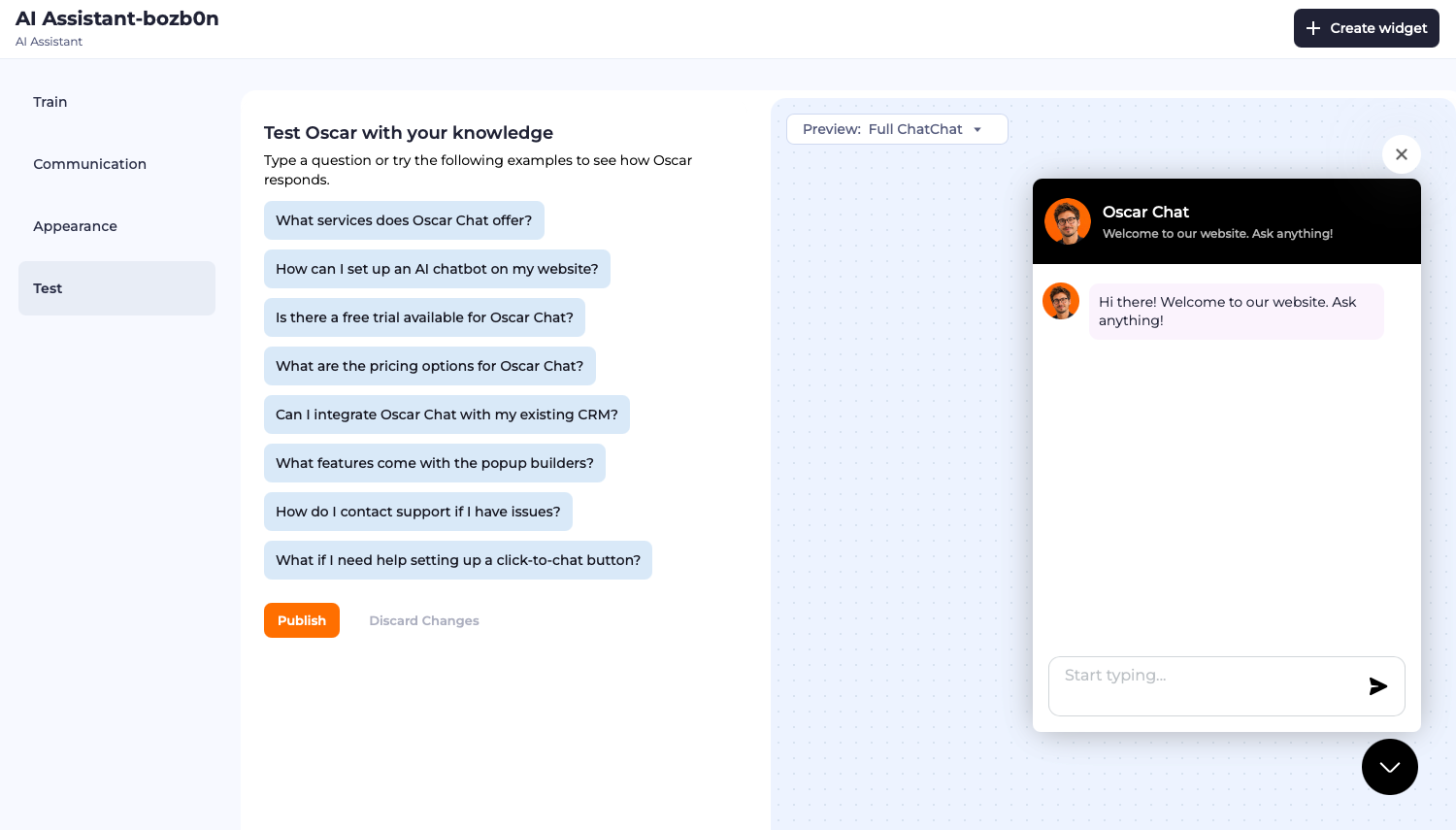
Before the bot meets your customers, interrogate it. Oscar Chat automatically generates test questions from your knowledge base — run through them and watch how the bot answers. The quality of its answers depends entirely on what it learned, so this is where you catch weak spots: replace vague answers with better-prepared ones, add missing Q&As, then re-test.
When you’re happy, hit Publish. The bot answers from your content in 50+ languages from day one.
4Go further: alternative ways to train your bot
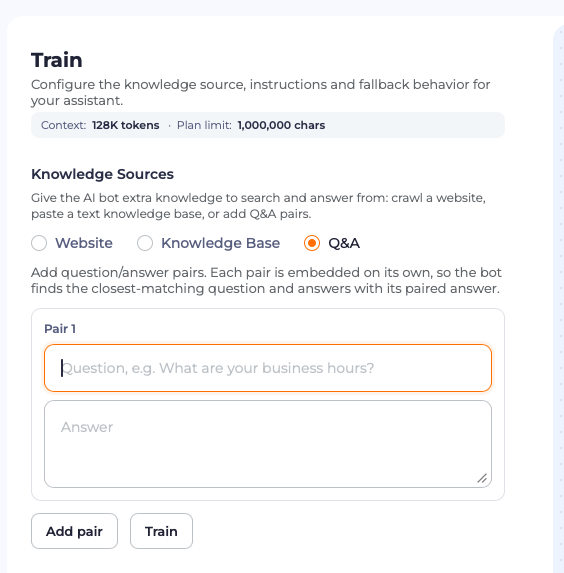
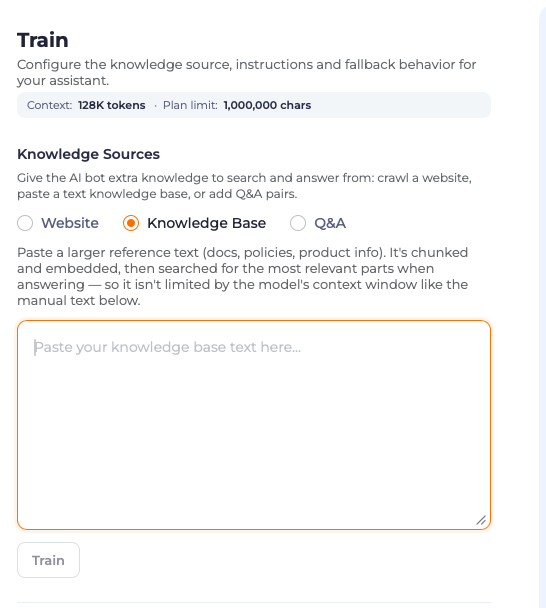
Crawling covers your public website — but it’s not the only knowledge source. In the Train screen, next to the Website tab, you’ll find two more ways to teach your bot.
The Q&A tab is for everything the crawl couldn’t learn. Add question/answer pairs — each pair is embedded on its own, so the bot finds the closest-matching question and answers with its paired answer. Perfect for:
- A promotion running this week only
- Answers to questions customers ask that no page addresses yet
- Temporary info: holiday hours, stock delays, event details
- Internal policies your team should be able to quote
The Knowledge Base tab is for larger reference texts — docs, policies, product info. Paste it in, and Oscar Chat chunks and embeds it, then searches the most relevant parts when answering. Unlike a plain text field, it isn’t limited by the model’s context window.
No re-crawl needed for any of this, no developer required. When the promotion ends, edit or delete the entry.
Important: keep these entries fresh. A Q&A about a Christmas sale, still active in March, is worse than no Q&A at all. Review them whenever you run a new campaign.
Ongoing: re-crawl when your site changes
New collection, updated policy, price change — update your website as usual, then re-crawl. The bot catches up in minutes. Make it a habit: site update → re-crawl → quick test.
Prefer to watch the whole process? Here’s a short video walkthrough of training a bot by crawling a website:
The reason this works so well is structural: your website is already organized the way customers think — products, categories, help sections. Crawling borrows that structure instead of forcing you to invent a new one.
What crawling can’t do — and the Q&A fields that cover it
Here’s the honest limitation: crawling only learns what’s public on your website. But every business has knowledge that never makes it onto a page:
- A promotion running this week only
- An internal policy you don’t publish but staff should know
- Answers to questions customers ask that no page addresses yet
- Temporary info: holiday hours, stock delays, event details
That’s why Oscar Chat pairs crawling with custom question-and-answer fields. Anything the crawl doesn’t cover, you add directly as Q&A pairs — no re-crawl needed, no developer required. When the promotion ends, you delete or edit that entry. The website stays the foundation; the Q&A fields handle everything exceptional.
And for knowledge that lives outside the website entirely, you can upload files (PDF, CSV, TXT, DOCX) or connect Shopify, Salesforce, Zoho, or Klaviyo. One brain, several sources.
New to Oscar Chat? Here’s how to add it to your Shopify store in minutes — and if you’re comparing options, see how it stacks up against Chatbase on training and pricing.
7-Day Pro Trial for Every New Account
For your first 7 days, you are automatically on the Pro plan.
FAQ
-
How long does it take to train a chatbot by crawling a website?
The crawl itself usually takes minutes, depending on how many pages your site has. Most merchants go from pasting their URL to a working bot the same day — compare that with two to four weeks of manual Q&A writing. -
Does the chatbot stay up to date when my website changes?
Yes — re-crawl the site and the knowledge base refreshes. Update your website once, as you normally would; the bot follows without duplicate work. -
What if some knowledge isn't on my public website?
Add it as custom Q&A pairs directly in Oscar Chat, or upload files (PDF, CSV, TXT, DOCX). Crawling covers the public foundation; Q&A fields and uploads cover everything else. -
Does website crawling work for stores in multiple languages?
Yes. The knowledge base built from your site can power answers in 50+ languages, which is especially useful for stores and clinics serving international customers. -
Is crawling better than uploading FAQs manually?
For most businesses, yes — it's faster and it stays in sync with your site automatically. Manual Q&A still has its place for promotions, internal policies, and edge cases, which is why Oscar Chat supports both. -
Can I crawl only specific pages instead of the whole website?
Yes. You can submit individual page URLs or a sitemap instead of the full domain — useful if you want the bot to learn from your help center but not from old campaign landing pages. -
Will crawling slow down my website?
No. The crawler reads your pages once, the same way a search engine bot does. Visitors won't notice anything. -
How often should I re-crawl?
Whenever you change something the bot should know about: new products, updated policies, price changes. There's no fixed schedule — re-crawl after meaningful site updates and run a quick test. -
What if two pages on my site contradict each other?
The bot can only be as consistent as your content. If it gives a muddled answer, check the source pages — usually one of them is outdated. Fix the page, re-crawl, and the answer clears up.