
Why static forms fail
They ask too early — or never. A footer newsletter box asks before you've earned any attention. A contact page form waits for the visitor to come to it, which most never do.
They ignore behavior. Someone who's been reading your pricing page for three minutes is not the same as someone who bounced after four seconds. Static forms treat them identically.
They feel like paperwork. Name, email, phone, company, message — every extra field is friction, and friction kills conversions. Most static forms were designed by someone who never had to fill one in.
What smart forms do differently
Smart forms behave less like paperwork and more like a good salesperson. Three things set them apart:
They trigger on behavior, not on page load. Exit-intent (catch them as they leave), after X seconds, after scrolling a certain percentage, after a period of inactivity — the form appears at the moment of highest intent, not before.
They offer something in return. A discount code, a free guide, early access. The exchange is explicit and immediate: your email for something you actually want.
They stay short. Name, email — maybe phone. Every field earns its place. The best-performing lead forms ask for the minimum and follow up later.
Here's what that looks like in practice:
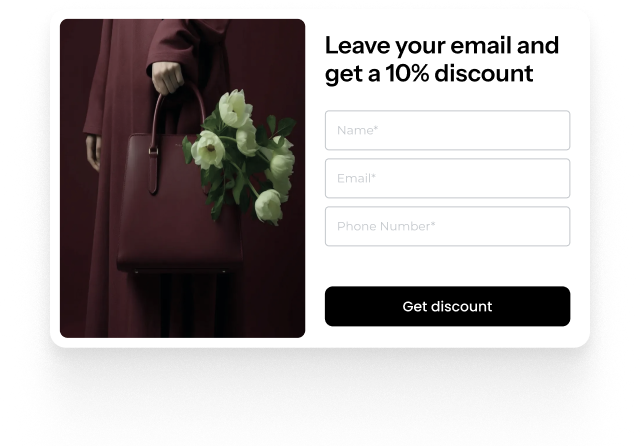
Anatomy of a high-converting smart form
Look at the example above. Every element is doing a job:
- The headline makes the trade obvious: "Leave your email and get a 10% discount." No guessing what happens next.
- The visual does the selling. Real product photography beats stock icons — it reminds the visitor what they're shopping for.
- Three fields, not seven. Name, email, phone number. Each one you'll actually use.
- One button, one action. "Get discount" — the button describes the reward, not the chore.
Compare that with a generic "Subscribe to our newsletter" box. One is a transaction with a clear payoff. The other is a favor you're asking a stranger.
How to build one in Oscar Chat
You don't need a designer or a developer. In the popup builder, you pick a template, adjust the text and styling, choose when it appears — and preview everything live before it goes near your site:
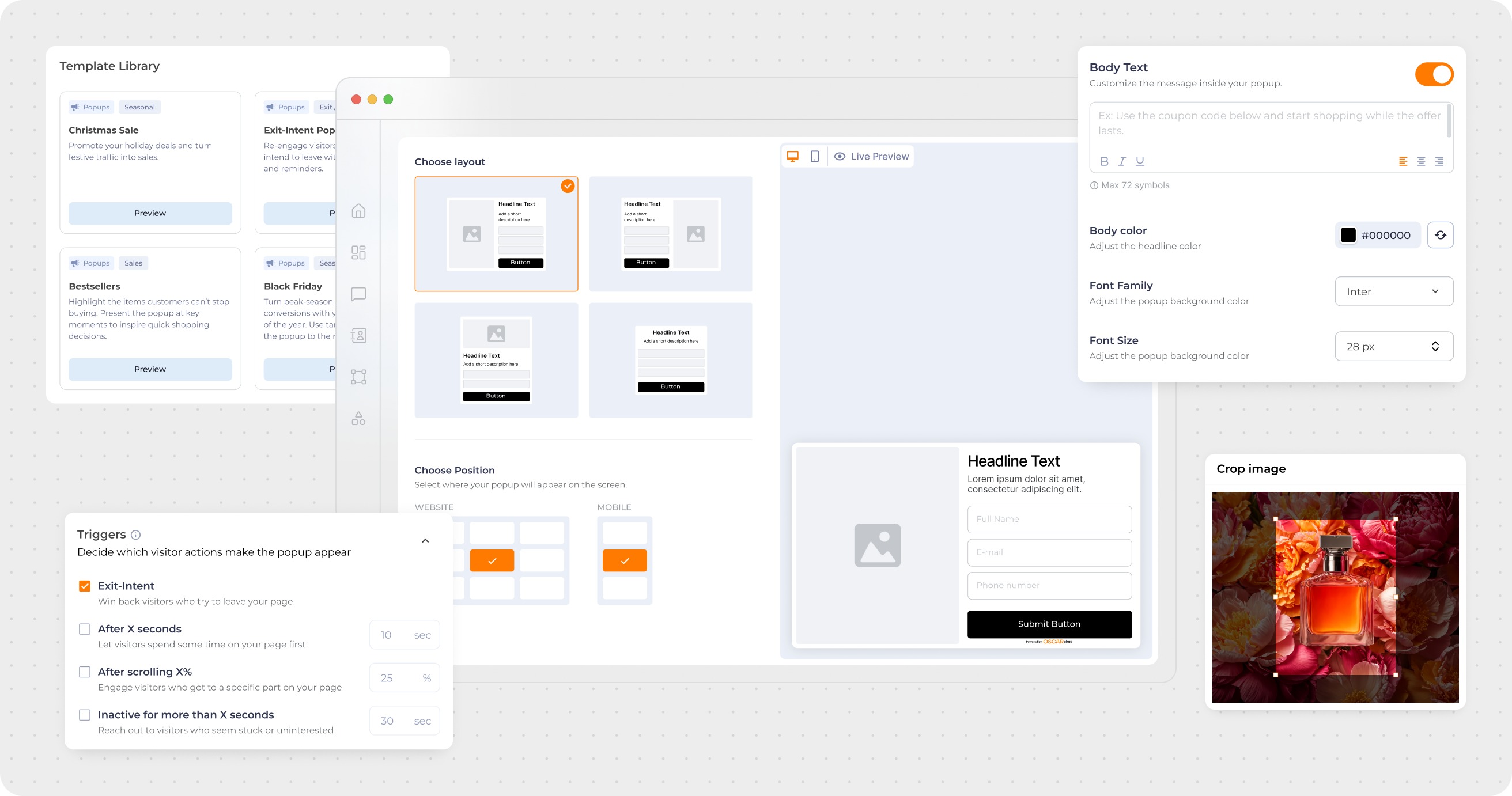
The trigger settings are where the "smart" happens. A few proven combinations:
- Exit-intent + discount — the classic cart saver: catch leaving visitors with 10–20% off.
- After 30 seconds on a product page + free shipping offer — reward engaged readers.
- Scroll 50% on a blog post + content upgrade — turn readers into subscribers.
Each popup can carry your branding, your copy, your offer — and it all works alongside the AI chatbot, so the visitor who doesn't convert on the form can still get answers in chat.
The form is only half the system
Here's what most "popup plugin" articles miss: the form captures the lead, but what happens in the next ten seconds decides whether it was worth it. Pair the form with an instant follow-up — a welcome discount code delivered immediately, a chatbot that greets the new subscriber, a WhatsApp message for the ones who shared a phone number.
Capture is the beginning of the conversation, not the end of it.
7-Day Pro Trial for Every New Account
For your first 7 days, you are automatically on the Pro plan.
FAQ
-
What is a smart form?
A lead capture form that triggers based on visitor behavior (exit-intent, time on page, scroll depth) instead of sitting statically on the page. It typically offers an incentive and asks for minimal fields. -
Do popups annoy visitors?
Bad ones do — the kind that appear instantly, can't be closed, or show on every page. Smart forms avoid this with behavioral triggers, frequency limits, and a clear value exchange. A well-timed popup with a real offer converts; a random one irritates. -
How many fields should a lead form have?
As few as possible. Name and email cover most use cases; add phone only if you'll actually use it (e.g., for WhatsApp follow-ups). Every extra field measurably drops conversion. -
What's the difference between Oscar Chat's forms and a standalone popup plugin?
They live in one system with your AI chatbot, live chat, and click-to-chat buttons — so a captured lead can continue the conversation in chat instead of hitting a dead end. One dashboard, one set of triggers, one brand. -
Can I use smart forms for Black Friday?
Absolutely — it's their best season. Seasonal templates, countdown-style urgency, and exit-intent discount codes are exactly what Black Friday traffic needs. Set them up before the rush, not during it.